Expenses
Photograph receipts, check them against your regulations, approve them and pass them into payroll, with VAT split, foreign currency and detection of duplicate receipts.
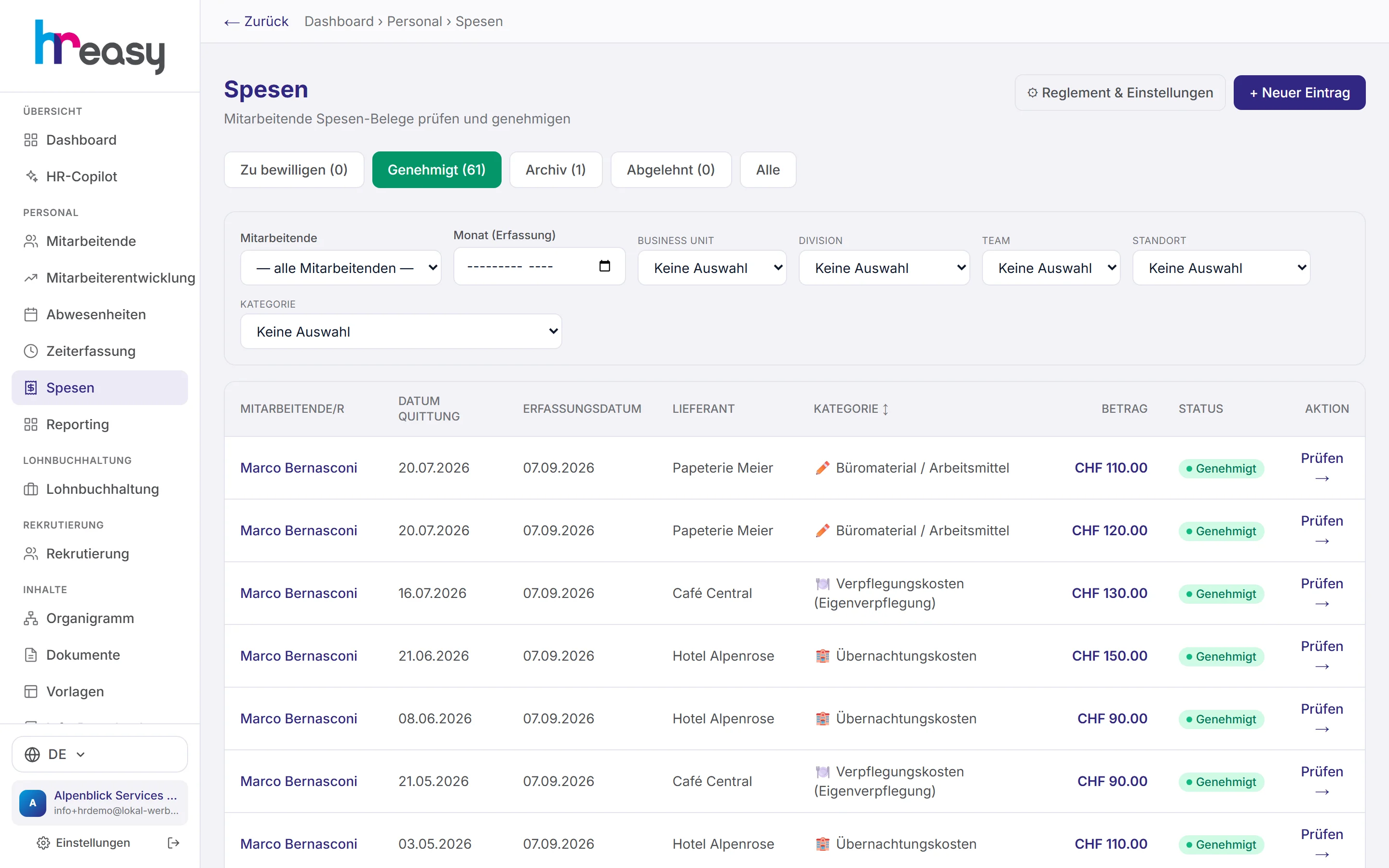
Expenses are small in amount and big in effort: receipts get lost, categories are chosen wrongly, nobody knows the limits in the regulations by heart, and at the end of the month someone gathers up the receipts.
In HREasy employees record an expense with a photo of the receipt in the portal or the app. The expenses policy with its limits is stored and shows any excess while the expense is being entered. You check and approve in one list, unusual patterns such as duplicate receipts are flagged, and approved expenses go into pay automatically.
Sound familiar?
- Receipts arrive in a bundle at the end of the month, crumpled or not at all.
- Every receipt has to be checked against the expenses policy by hand.
- Foreign currencies are converted at whatever rate comes to hand.
- The same receipt turns up twice, and nobody notices.
All receipts in one list, sorted by status
The tabs «Zu bewilligen», «Genehmigt», «Archiv», «Abgelehnt» and «Alle» (to approve, approved, archive, rejected, all) show where each expense stands. Filters by person, month, organisational unit, branch and category narrow things down; the total per currency is shown at the bottom.
One click opens the receipt with photo, receipt and entry date, gross amount, private share and effective amount, plus the VAT split.
- Approved receipts can be edited until the 3rd day of the following month
- Manual entry on behalf of a person
- An approved month in time tracking also locks the expenses
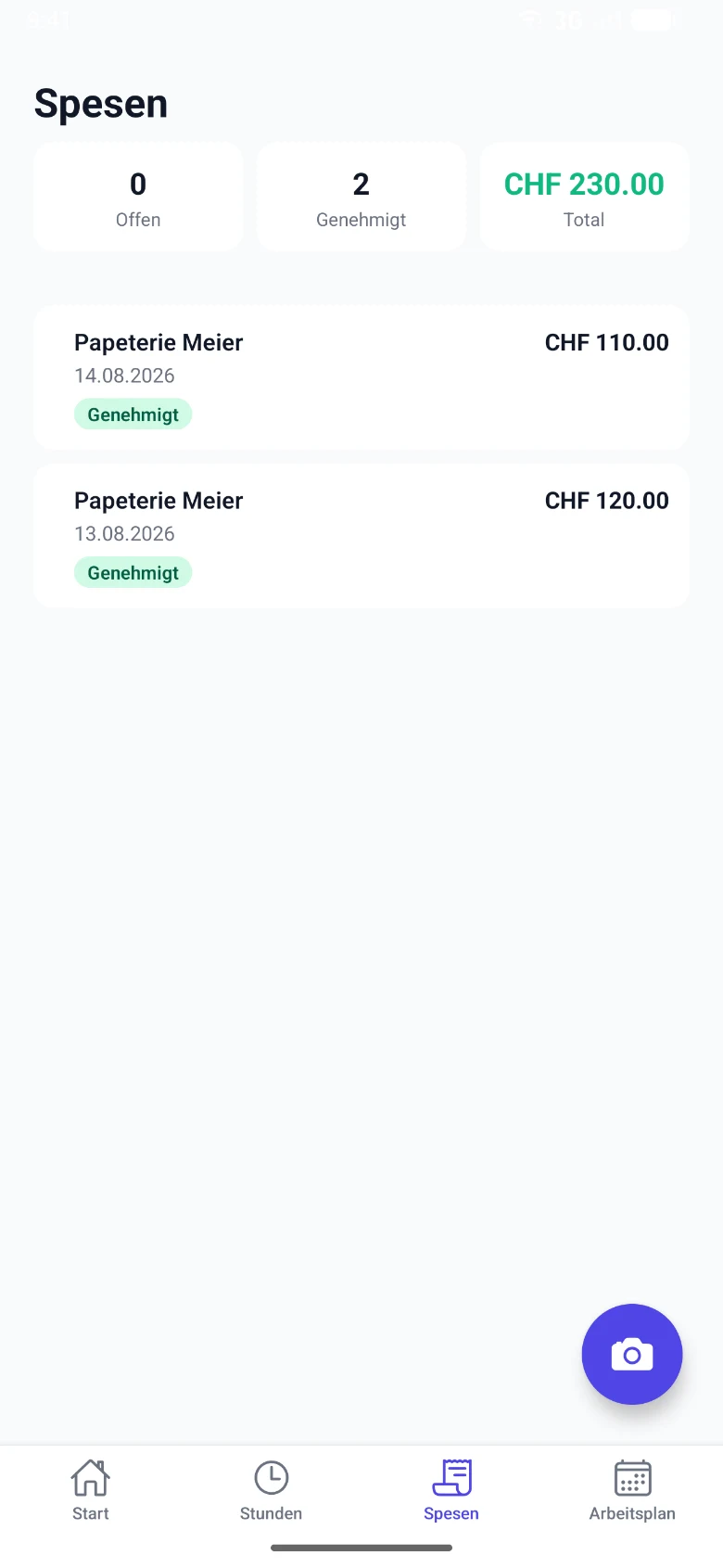
Photograph the receipt, done
In the app, employees photograph the receipt with the camera or choose it from the gallery. Details such as amount and date are suggested from the photo and can be checked and corrected before submitting.
The expenses policy with its limits is visible in the app, and the status of every expense, open, approved or rejected, is shown right next to it.
- Camera or gallery
- Limits from the regulations shown while entering
- Open, approved and total at a glance
Mileage, multiple trips and policy notices
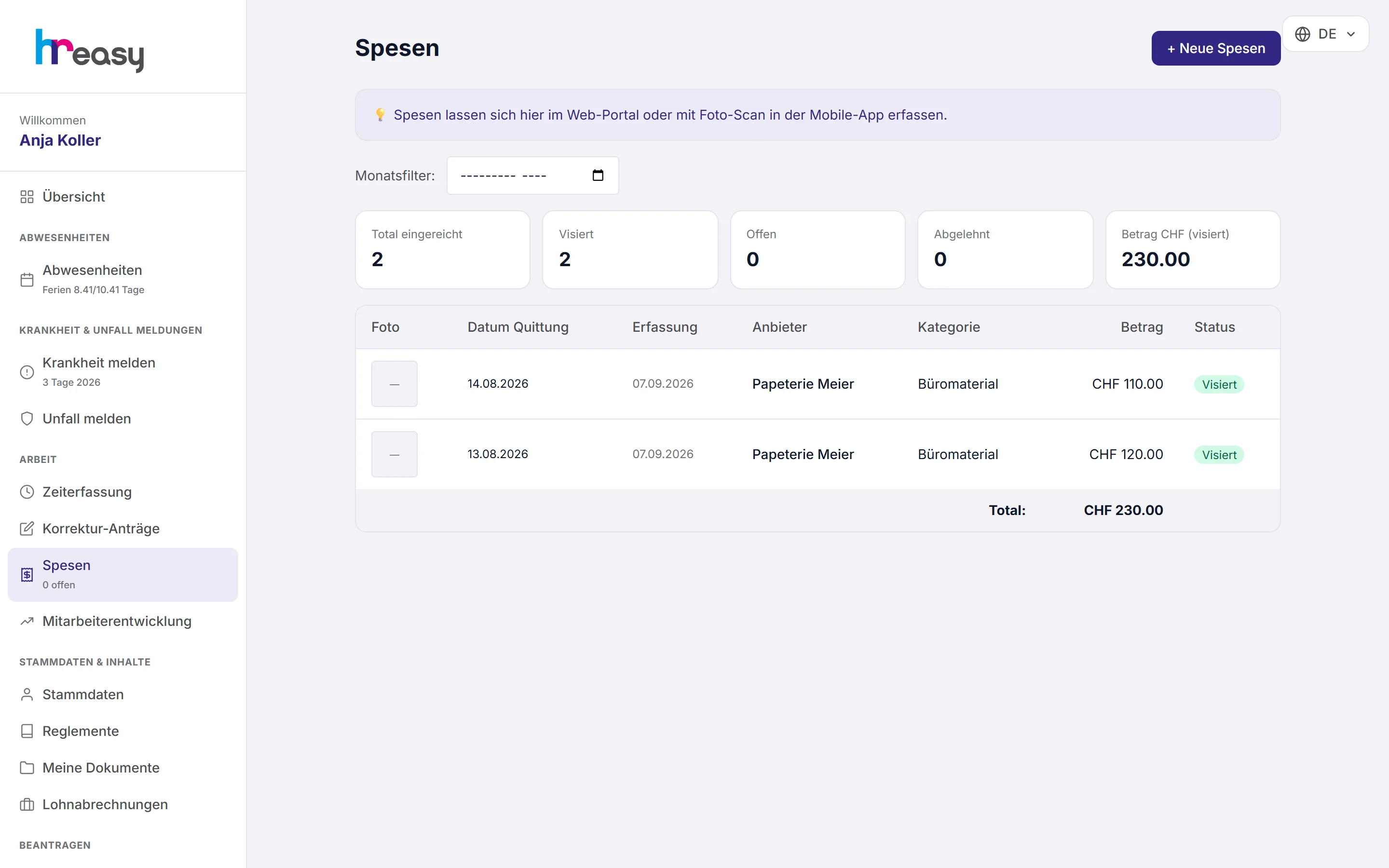
In the web portal, employees record expenses with a photo, mileage at the rate of their policy variant, or several trips at once. If an amount exceeds a limit, they see it while typing, not only after rejection.
The list shows the status, the reason for rejection and the effectively reimbursed amount of every expense.
- Mileage at the stored rate
- «Diverse Fahrten» (multiple trips) mode
- Reason for rejection visible to the person
From receipt to payment
Every expense follows the same path, and every step is traceable.
Record
Photograph the receipt, choose category and project, see the limit immediately.
Check
Policy, foreign currency, duplicate receipts and unusual patterns are flagged.
Approve
Approve or reject with a reason; if needed, an AI plausibility check.
Close
The approved month locks the person's expenses and times.
Pay out
Approved expenses flow into the payroll run or to payroll.
Everything works together
No module stands alone. What you enter here flows automatically to wherever it is needed, without entering it twice.
What HREasy offers
Policy variants
Freely definable variants such as employees, management or field staff, with limits per receipt, day and month.
CEA before regulations
A CEA variant is created empty and filled with the rates from the agreement; the CEA takes precedence over company regulations.
VAT split
All three Swiss rates (8.1, 2.6 and 3.8 %) shown individually per receipt.
Foreign currency at the ECB rate
The rate on the date of the receipt is fetched automatically; a striking deviation in a manual entry is flagged.
Mileage
Rate per kilometre per variant and «Diverse Fahrten» mode for several routes.
Anomalies
Duplicate receipts, amounts just below the limit and unusual clusters are flagged.
AI plausibility check
Does the receipt fit the business purpose? A verdict with reasons; the decision stays with you.
Entertainment with mandatory details
For entertainment expenses, participants and business purpose are mandatory.
Approvers and deputies
You define in the settings who approves, who deputises and where the export goes.
What you should know
The policy checks along the way, not only accounting
Limits only help if people know them while entering. In HREasy employees see the limit of their policy variant while typing, and in the administration an excess is shown right next to the amount.
Guideline values only fill empty fields, so the existing rates of your regulations are never overwritten. For CEA companies, the CEA takes precedence over company regulations.
Foreign currency without calculation errors
For receipts in euros or other currencies, HREasy fetches the ECB rate for the day of the receipt. Anyone entering a rate by hand and, say, getting the direction the wrong way round gets a warning.
That way a hotel bill from abroad is not reimbursed at the wrong rate, and the statement remains traceable.
Frequently asked questions
How do employees submit expenses?
With a photo of the receipt in the app or the web portal, with category, amount and, if needed, project.
Can I set my own limits?
Yes, per receipt, day and month, for each policy variant. For CEA companies a separate CEA variant can be created.
Does the AI decide on expenses?
No. The AI plausibility check gives a verdict with reasons; you always approve or reject.
How do expenses get into pay?
Approved expenses flow into the payslip as reimbursement of expenses under CO Art. 327a.
Are duplicate receipts detected?
Yes. Duplicate receipts, amounts just below a limit and unusual clusters appear under «Auffälligkeiten» (anomalies).
More modules
Ready to automate expenses?
Set up in 5 minutes, no HR knowledge needed. The agent takes care of the rest.
Request trial access now