Sickness & accident
Report sickness and accidents digitally, upload the medical certificate, keep UVG and daily sickness benefit deadlines in view, with a direct effect on time balance and pay.
When someone falls ill or has an accident, a lot has to be right at the same time: who is absent, for how long, to what percentage, is there a medical certificate, and does the insurer need to be informed yet? In many companies this lives in e-mails and phone notes.
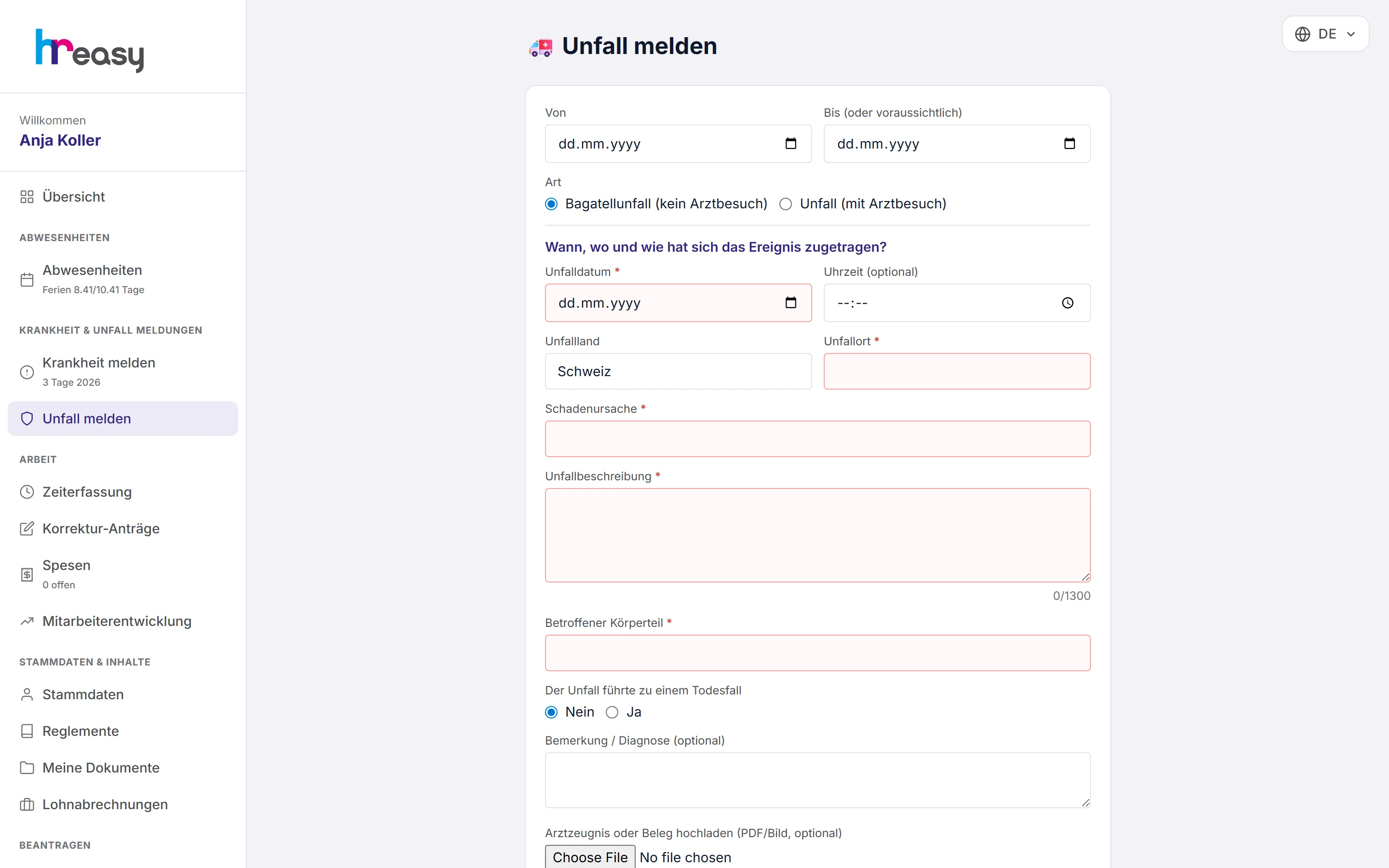
In HREasy employees report sickness or accidents themselves in the portal, with the period, incapacity for work in per cent and the medical certificate. The accident report follows the structure of the Suva notification. A sick report needs no approval and takes effect immediately: it credits the target time, appears on the dashboard and flows into the payroll calculation with the degree of incapacity.
Sound familiar?
- Sick notes arrive by text message, and the medical certificate is somewhere in the inbox.
- Nobody knows exactly when the daily sickness benefit insurer has to be informed.
- For accidents, the place, the course of events or the injured body part are missing when the report is due.
- Continued pay is calculated by hand because the absence was never recorded properly.
Reported in a minute, with the certificate
Employees report sick in the portal: from when, probably until when, treating doctor, incapacity for work in per cent and a comment. The medical certificate is attached straight away as a PDF or image.
If the certificate is still missing, the report stays in the portal as a pending item «Arztzeugnis nachreichen» (submit medical certificate) until the file has been uploaded.
- No approval needed: the absence applies immediately
- Partial incapacity for work in per cent
- Warning after more than 23 days because of the daily sickness benefit insurer's notification deadline
The accident report, structured like the Suva form
The accident report asks for what the insurer will need later: minor accident or accident with a doctor's visit, date, place, cause, a description of what happened and the injured body part. Time and country are optional.
If an accident with a doctor is reported, HREasy points out that registration with the accident insurer is required from the first day.
- Minor accidents and accidents with a doctor kept apart
- Mandatory fields for date, place, cause, course of events and body part
- The medical certificate is filed in the document archive
Sickness and accidents per person and team
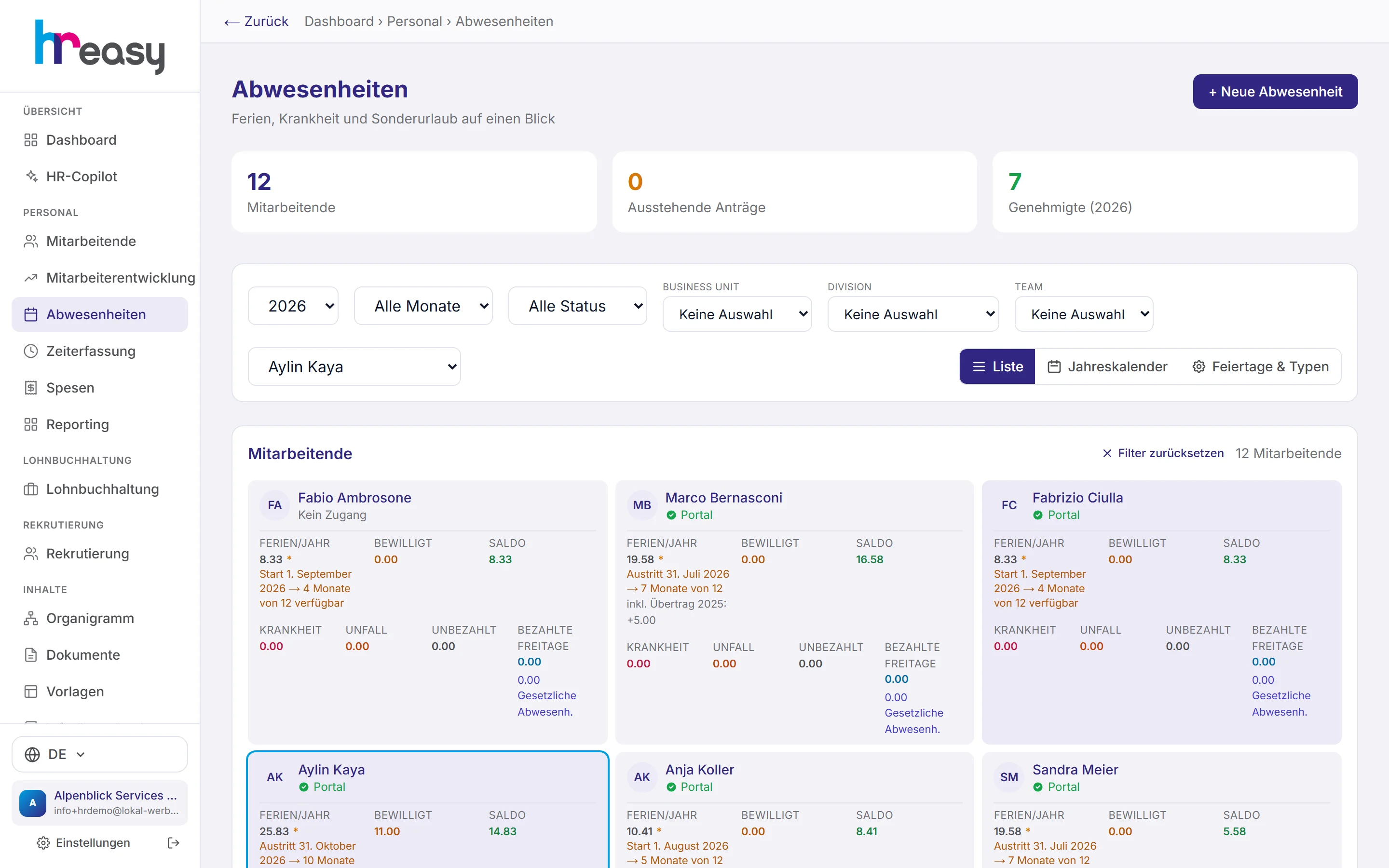
In the administration, sickness and accident days are shown on each person's card, next to holidays and unpaid days. Filters by person, month and organisational unit show the history, and the annual calendar shows the situation in the team.
The dashboard reports sickness and accident notifications without a medical certificate, as well as who is sick or injured today.
- Key figures «Krank heute» and «Unfall heute» (sick today, accident today) on the dashboard
- Notice for reports without a medical certificate
- Absence patterns and thresholds in reporting
From the report to the payslip
The sick report is the start; everything else runs in the background.
Report
The person reports sickness or an accident in the portal, with period, percentage and doctor.
Provide proof
Attach the medical certificate as a photo or PDF, straight away or later as a pending item.
Credit
The absence applies immediately and credits the daily target in time tracking.
Monitor
Notices on missing certificates, UVG from day 1 and the daily sickness benefit deadline after 23 days.
Pay
Waiting period, daily sickness benefit or the Bern scale flow into the payslip.
Everything works together
No module stands alone. What you enter here flows automatically to wherever it is needed, without entering it twice.
What HREasy offers
Self-reporting in the portal
Employees report sickness and accidents themselves, without e-mails or phone chains.
Incapacity in per cent
Partial incapacity for work is recorded too and taken into account in pay later.
Medical certificate as a file
Attach a photo or PDF directly; if it is missing, «Arztzeugnis nachreichen» stays as a pending item.
Accident report in Suva structure
Date, place, cause, course of events and body part, separated into minor accidents and accidents with a doctor.
Deadline notices
UVG registration from day 1 for accidents with a doctor, warning after more than 23 days because of the daily sickness benefit deadline.
Effective immediately
Sickness needs no approval and credits the target time immediately.
Continued pay calculated
Waiting period with full pay, then daily sickness benefit, or without it the Bern scale (CO Art. 324a).
Notices on the dashboard
Reports without a medical certificate and the number of people sick or injured today.
AI answers for employees
Under «Frag die KI» (ask the AI), HREasy answers questions on sickness and accidents, based on your regulations first.
What you should know
How sickness gets into the payslip
During the waiting period the employer pays the full salary; after that, in many companies the daily sickness benefit takes over, often at 80 %. Without daily sickness benefit insurance, continued pay follows the Bern scale (CO Art. 324a).
HREasy calculates this in its own payroll based on the degree of incapacity from the sick report. With automatic payroll, HREasy passes on daily benefits and continued pay independently.
Deadlines that get lost in everyday work
An accident with a doctor's visit must be reported to the accident insurer, and many daily sickness benefit policies require notification after a certain number of days. Such deadlines are easily forgotten when the absence only exists in the manager's head.
HREasy shows the UVG notice right in the accident report and warns as soon as a sickness lasts longer than 23 days. Missing medical certificates remain visible as pending items until they arrive.
Frequently asked questions
Does a sick report have to be approved?
No. Sickness needs no approval; the absence applies immediately and credits the target time.
When is a medical certificate required?
Your company defines that in the contract or regulations; from the third day is common. In HREasy the certificate can be attached at any time; if it is missing, the pending item stays visible.
Are accidents handled separately?
Yes. The accident report has its own fields based on the structure of the Suva notification and distinguishes minor accidents from accidents with a doctor's visit.
Does HREasy calculate continued pay?
Yes. Payroll takes into account the waiting period, daily sickness benefit or the Bern scale and the degree of incapacity from the report.
Can colleagues see the report?
No. In the portal every person only sees their own absences; the report itself is seen by authorised administrators.
More modules
Ready to automate sick leave?
Set up in 5 minutes, no HR knowledge needed. The agent takes care of the rest.
Request trial access now